Thursday, December 11, 2014

Installing Jade in Netbeans

WORKING WITH JADE IN NETBEANS

clear concise step from this blog...
http://towardsnothing.blogspot.in/2009/02/setting-up-jade-in-netbeans.html

1. Have Netbeans installed, I think that is pretty straightforward so I am skipping the details.

2. Download JADE, just the minimum if you want, but I recommend all of the packages because if you are going to use JADE you will probably end up using them.

3. Extract the files into a folder, if you have all of the packages I suggest different folders.

4. Run Netbeans, create a project, etc. Again this is quite straightforward and if you are using JADE in Netbeans you should have basic knowledge of the tool.

5. Right click on Libraries, Add Library.

6. Create Library.

7. I would suggest the name to be JADE

8. Add the .jar files contained in the "bin" folder that you created (In the minimum JADE package you only have this folder), the files should be the folder you created + "/jade/lib/".

9. Right click on your project, Set Configuration, Customize... 

10. Write on the main class "jade.Boot", and on arguments "-gui".

Now if you run the program it will launch the GUI that allows you to run agents.
Hope this is clear I could have used some screen shots, but I think this is quite straightforward, or at least I hope. In the unlikely event of a blog reader using these steps and have some questions, please fell free to leave a comment, and I'll get back to you.


Tuesday, August 26, 2014

Notes on A market-oriented hierarchical scheduling strategy in cloud WF systems

Notes on A market-oriented hierarchical scheduling strategy in cloud WF systems

Authors
Zhangjun Wu, Zhiwei Ni : Hefei Univ of Tech., China
Zhangjun Wu, Xiao Liu, Dong Yuan, Yun Yang - Swinburne Univ of Tech, Australia

A market-oriented hierarchical scheduling strategy is proposed.
service-level scheduling deals with task-to-service assignment
tasks in indv. WF instances are mapped to cloud services in the global cloud markets based on functional and non-functional QoS req.
task-level scheduling : deals with optimization of the Task -to-VM assignment in local cloud data centres.
Running cost of cloud WF systems will be minimized give the satisfaction of QoS constraints for individual tasks.
A package based random scheduling algorithm is presented for candidate service-level scheduling algorithm
3 metaheuristic scheduling algorithms implemented for candidate task-level scheduling algorithm

  • GA
  • ACO - best performance.
  • PSO

Performance metric :
Optimization rate on makespan,
Optimization rate on cost
CPU time


Why do research?

Found this article inspiring and helpful when sometimes I lost track of what exactly i'm doing

Doing a PhD – Preparing for a Career in Research 

“The mere formulation of a problem is far more essential than its solution, which may be merely a matter of mathematical or experimental skill. To raise new questions, new possibilities, to regard old problems from a new angle requires creative imagination and marks real advances in science.” – Albert Einstein 

What is a problem formulation? The problem formulation consists of just one sentence and should make it clear to everyone what research problem, you aim to address and to whom and where it is relevant. In other words, the problem formulation is the heart (or core) of your thesis to which you should always return if you lose track during your further research and writing process

The problem formulation is based on the rationale you reached through your explorative search and may be the first thing you write related to your thesis. The aim of a problem formulation is also to set a framework for your research and a good problem formulation is essential for completing a good study.

Having read all that... I feel inspired... but still lost :(

Monday, August 11, 2014

Notes from agent based elastic cloud bag-of-tasks - Garcia et al

A family of heuristics for agent-based elastic Cloud bag-of-tasks concurrent scheduling

September 2013

Authors : 
J. Octavio Guitierrez -Garcia, Post doc in Korea (now in ITAM )
Kwang Mong Sim, United Kingdom.
Published in FGCS, link

In this paper they have presented the results of 14 scheduling heuristics which they have used to schedule BoTs in a dynamic environment using agents communicating and coordination using Contract Net Protocol.

BoTs : numerous unconnected (i.e. without precedence constraints) tasks which can be highly parallelized given their unconnected nature.

Classification of scheduling heuristics

immediate mode : map BoT tasks to cloud resources as soon as they arrive at the scheduler, eg. FCFS
batch mode : pre-schedule BoT tasks on a previously defined set of cloud resources before starting the execution, eg. Min-min, Max-min.

Aim : to maximize resource utilization

Why agents?  They are endowed with distributed and cooperative problem solving techniques.

Contract Net Protocol : allow automated and dynamic selection and composition of cloud resources from a pool of cloud providers to execute BoTs.

Why agent based problem solving technique?  it supports distributed, concurrent, and parallel scheduling and execution of BoTs in heterogeneous sets of dynamically provisionned cloud resources allocated in terms of 1 hour time slots (after the model in Amazon EC2)

Scheduling heuristics - derived from a combination of the following two phases

1) Task Ordering 
  • Unordered (U)
  • Tasks ordered by size from large to small (LtoS)
  • Tasks ordered by sized from small to large (StoL)
2)Task Mapping Policies
  • Random Mapping(R)
  • Maximum expected remaining allocation time mapping (MaxET)
  • Maximum current remaining allocation time mapping (MaxCT)
  • Minimum expected remaining allocation time mapping (MinET)
  • Minimum current remaining allocation time mapping (MinCT)
{U, LtoS, StoL) X {R, MaxET, MaxCT, MinET, MinCT} /{U,R}

{U,R} represents a completely random immediate mode scheduling heuristic that follows FCFS allocation policy... therefore this is used for comparison.

Implementation

It is implemented using JADE (Jave Agent Development framework).... (finally! something familiar :) )


Important Observations and conclusions from Garcia et al (that I feel may be relevant for my work )
  •  BoTs containing many small tasks and few big tasks scheduled using the MaxET task mapping policy ( {U, LtoS, StoL} X {MaxET}) had the shortest makespans regardless of the task ordering type.
  • Due to the NP-complete nature of the scheduling problem, there was not dominant scheduling heuristic for all the BoT types ( uniformly, normally, right-normally and left-half normally distributed BoT's ), neither the proposed cloud scheduling heuristics based on the remaining allocation time of cloud resources nor the benchmark scheduling heuristics.
  • Agents in the testbed were capable of successfully executing and scheduling BoTs concurrently with a 100% success rate for randomly generated BoTs of a wide variety of sizes in randomly generated cloud environments even with high execution request rates and handling multiple BoTs at the same time.
  • agents in the testbed efficiently scheduled and executed BoTs by sending only a linearly increasing number of messages among CAs, BAs, SPAs and RAs that depends only in the number of tasks contained in BoTs.
  • Agents' distributed and cooperative problem solving techniques are efficient enough to support concurrent scheduling and execution of multiple BoTs with extremely high execution request rates and stringent constraints.

Performance Metrics

  • Av BoT makespan
  • BoT Success rate
  • Av. BoT scheduling overhead time
  • Av. no. of msg exchanged for executing BoT's
Found this in future research directions useful
Designing cloud scheduling heuristics for handling data 

Scheduling in hybrid cloud notes from Bosche et al

Objective of hybrid clouds :

  The usage of internal infrastructure in tandem with public cloud services.

Hybrid Clouds

In a hybrid cloud setting, the execution of applications occurs
through the deployment of virtual machine instances on resources
internal to the consumer organization, as well as resources
provided by the public cloud providers.

Characteristics of Provider


Need for research :

  optimization problem of allocating resources in a cost-optimal manner with support of QoS such as deadlines.

From what I understand, they are calculating cost and the tasks are being scheduling in public or private cloud... whichever is cheaper
A linear optimization solution was done in their previous work for static jobs... they concluded it is not feasible.

Another dead end... I really thought I can formulate a problem with the future work in this paper... :(

Friday, August 8, 2014

Popular heuristics for Workflow Scheduling

Myopic

It is an individual task scheduling heruristic
It is the simplest scheduling method for scheduling workflow applications.
It makes scheduling decisions based on individual task.
System Implemented : Condor DAGMan
  It schedules an unmapped ready task in arbitrary order to the resource, which is expected to complete the task earliest.

Min-min

  This prioritizes workflow tasks based on their priorities
It assigns task priority on the basis of its expected completion time (ECT) on a resource.
It organizes workflow tasks on the basis of its expected ECT on a resource.
It organizes WF tasks into several independent task groups
schedules each group of independent tasks interactively.
In every iteration, it takes the set of all unmapped independent tasks T.
generates the minimum ECTs (MCT) for each task t in T where MCT t = min ECT (t,r) or every resource in R.

** It considers all unmapped tasks during each mapping decision.
In comparison, Myopic only considers one task at a time.
Systems implemented in : vGrADS, Pegasus
http://vgrads.rice.edu/

Max -min

It is similar to min-min
it sets the priority of the task to that which requires the longest execution time rather than shortest execution time.
At each iteration after attaining MCT values for all unmapped independent tasks, tasks having maximum MCT is chosen to be scheduled earliest.  Any attempts to minimize WF execution time by assigning longer tasks to comparitively best resources.
System Implemented in : Pegasus

HEFT (Heterogeneous Earliest Finish Time)

It is a list scheduling algorithm
gives higher priority to WF task having higher rank value
rank value:
  It is calculated by utilizing avg. execution time for each task and avg. communication times between resources of two successive tasks.
  Tasks in CP have comparitively higher rank values.
It sorts the tasks in decreasing order of their rank values.
tasks with higher rank value have higher priority.
tasks are scheduled in order of their priorities.
each task is assigned to the resource that can complete the task at the earliest time.
WF is represented as DAG and rank values are calculated by traversing the task graph in BFS (Breadth First Search) manner. in reverse order of task dependencies.

Advantage over min-min and max-min

while assigning priorities to tasks, it considers entire WF rather than focusing on only unmapped independent tasks.
Systems Implemented : ASKALON WF manager to provide scheduling for quantum chemistry appln WIEN2K

Metaheuristics

GRASP: Greedy ranodmized adaptive search procedure

iterative radomized search technique
A number of iterations are conducted to search a possible optimal solution for mapping tasks on resources.
A solution is generated at each iterative step.
best solution is kept as the final schedule.
It terminates when the specified termination criterion (no. of iterations) is satisfied.
* can generate better schedules than other scheduling techniques.
* It searches the whole solution space considering entire workflow and available resources.

GA : Genetic Algorithm

similar to GRASP
It allows high quality solution to be derived from a large search space in polynomial time by applying principles of evolution.
It combines exploitation of best solution from past searches with exploration of new regions of solution space.
Instead of creating a new solution by randomized search as in GRASP, GA generates new solution at each step by randomly modifying the good solutions generated in previous steps.
This results in a better solution.

Friday, July 4, 2014

Notes on Workflow Scheduling and heuristics used

These are some notes from

Definitions

Workflow: W(T,E) consists of a set of tasks
 T= {T1,T2,   Tx,.... Ty, Tn}
A set of task dependencies among the tasks,
E = {<Ta,Tb>, ....., <Tx,Ty>}
where Tx is the parent of Ty
R = R1,R2, .... Rx,.... Ry, Rm }
set of available resources in the computational grid.

Workflow Scheduling Problem : 
represented a s DAG ( directed acyclic graph )
nodes : tasks
graphs edges : data dependenies

mapping of the WF tasks to grid resources (T --> R).
where makespan M is minimized.

Workflow Task : a set of instructions that can be executed on a single PE of a computing resource.
Entry Task: no parent task.
Exit task : no child task.
Ready task : task that has all of its parent tasks finished.

Schedule length / makespan : overall finish / completion time of an application

Objective : to minimize the makespan of a parallel application by proper allocation of tasks to processors/resources and arrangements of task execution sequences.

* It is an NP complete problem, i.e., problem can be reduced to be solved in polynomial time
Notes on NP time
NP stands for Non-deterministic Polynomial time.
This means that the problem can be solved in Polynomial time using a Non-deterministic Turing machine (like a regular Turing machine but also including a non-deterministic "choice" function). Basically, a solution has to be testable in poly time. If that's the case, and a known NP problem can be solved using the given problem with modified input (an NP problem can be reduced to the given problem) then the problem is NP complete.
The main thing to take away from an NP-complete problem is that it cannot be solved in polynomial time in any known way. NP-Hard/NP-Complete is a way of showing that certain classes of problems are not solvable in realistic time.

These NP-complete problems really come up all the time. Knowing they're hard lets you stop beating your head against a wall trying to solve them, and do something better:
  • Use a heuristic: If you can't quickly solve the problem with a good worst case time, maybe you can come up with a method for solving a reasonable fraction of the common cases.
  • Solve the problem approximately instead of exactly: A lot of the time it is possible to come up with a provably fast algorithm, that doesn't solve the problem exactly but comes up with a solution you can prove is close to right.
  • Use an exponential time solution anyway: If you really have to solve the problem exactly, you can settle down to writing an exponential time algorithm and stop worrying about finding a better solution.
  • Choose a better abstraction: The NP-complete abstract problem you're trying to solve presumably comes from ignoring some of the seemingly unimportant details of a more complicated real world problem. Perhaps some of those details shouldn't have been ignored, and make the difference between what you can and can't solve.

 Most popular heuristics used for WF Scheduling

(A heuristic describes a rule or a method that comes from experience and helps you think through things, like the process of elimination, or the process of trial and error. You can think of a heuristic as a shortcut.)
  • Myopic
  • Min Min
  • Max-Min
  • HEFT

Metaheuristics used

(Meta-heuristics are general-purpose algorithms that can be applied to solve almost any optimization problem. They may be viewed as upper level general methodologies that can be used as a guiding strategy in designing underlying heuristic.)
  • GRASP
  • GA
dff

Discussion with Guide

To be done:

come up with problem statement, based on the review
support it with a mathematical model.

Work to be carried out:
 In order to come up with a proper problem statement I think I have to analyze the papers collected for review, reread them and find out what is missing...
or short cut... I can take the latest paper and look at Future work to be done... (time constraint.. so i'll do this...)


Performance metrics

The most common performance metrics are

response time
According to IBM dictionary of Computing.
"the elapsed time between the end of an enquiry or demand on a computer system and the beginning of a response."
In the simulation I've done.... it will be the difference between start time and submit time, i.e.,
response time = start time - submit time.
In this case, it will be the same for all, because we are using time shared mode.

CPU Utilization
Came across this post from Rodrigo on calculating CPU utilization in cloudsim...
time vs. % of cpu utilization.
found this article on how to calculate CPU utilization.
another link on calculating CPU utilization.
another one here.
Throughput : the number of served requests.
time vs. number of served requests

Monday, June 30, 2014

Modified Log of the LCG workload

Finally I have the correct log.  I think there is a bug in the standard workload format reader in cloudsim.... it just never reads the fields correctly.
Couldn't figure out how to read the SWF file in java... so I've read it using perl script.
Then, took only the needed fields
  1. Job ID
  2. Submit Time
  3. Wait Time ( Not Applicable when submitting workloads )
  4. Run Time
  5.  No. of Processors
  6. User ID
  7. Group ID
  8. Partition ID


Hopefully now the simulation will run correctly.

I also had another doubt... the generateWorkflow() method assigns the run time of the cloudlet to the the cloudletLength ( which according to defn is No. of instructions in MI ).
I came across this post from Rodrigo who is one of the developers of cloudsim...


So now i'm just going to assign run time/ Execution time to cloudlet length... cos its just a simulator...
Later when I'm running this in Eucalyptus or something, i'll use RuBIS application or something like that...

On another note... 
found another simulator which extends cloudsim called the workflowSimulator.
This simulate clusters jobs as tasks and submits them...
May be of use somewhere along the line.

Wednesday, June 25, 2014

Calculation of Estimated Finish Time

the issue in the previous post... how to calculate estimated run time. 
Each cloudlet requires 1 PE, so at a time if there are 2 cores in a host with 2 VM's at a time, only 2 cloudlets can excecute at a time...
so capacity of VM's with 2 cores are 2000/2 = 1000 and
capacity of VM's with 1 core is 1000/1 = 1000.

(In addition to this there is  a 10% performance degradation due to VM migration in time sharing mode.)

Tuesday, June 24, 2014

Calculation of estimated run time

In order to calculate the estimated run time est and eft have to be calculated for Time shared.
est : estimated start time
eft : estimated finish time
ct : the current simulation time
cores(p) : the number of cores ( processing elements) required by the cloudlet
rl : the total number of instructions that the cloudlet will need to execute on a processor.
In order to calculate capacity the following formula is used:

Using these formula, calculating eft for host with 1 core(PE) is correct
eg. VM #4 is allotted to Host #0, mips of VM#4 = 1000.
cloudlet executed on VM#4 has ID=5 and length= 969.
capacity = 1000 / max(1, 1) = 1000
eft = 0+ 969/1000 = 0.969.

But when I try to calculate for host with 2 cores, the estimated runtime is not coming correctly. 
Perhaps, it is mentioned in the defn that 10% performance degradation accompanied with VM migration...
Another problem is that when i try to calculate capacity for 10,000 cloudlets, where 1000 cloudlets are allocated to each VM, capacity =2000/1000 = 2
So actual run time for cloudlet ID 1 = 83/2=41, but in the simulation it gets over by 0.952 (what to do now :( :(
to be cont.....

Monday, June 23, 2014

Notes on Time shared VM scheduling and time shared Cloudlet scheduling.

So I got the simulation results, but nothing seems to be happening.
All the cloudlets start at 19.6 units of time.... i am assuming after all the cloudlets have been scheduled...
So now if we take a closer look...
I segregated the scheduling of cloudlets by VM... so sample output for VM#0 is given below.

If I use the formula, for Response time as start time - submit time.... I'm getting 19.6 for all the cloudlets...
and also if i see cloudlet ID 21 and 1, 9981, they all start at the same time...
(After looking at the concepts more thoroughly,  in time shared cloudlets and VM's, multiple cloudlets can multitask within a Vm )
I've specified VM Utilization Full.

Looking at the definition once more we see...

Allocation of VM's to the host

VmAllocationPolicy is an abstract class that represents the provisioning policy of hosts to virtual machines in a Datacentre. It supports two-stage commit of reservation of hosts: first, we reserve the host and, once commited by the user, it is effectively allocated to he/she.
And from this class, we use:
VmAllocationPolicySimple is an VmAllocationPolicy that chooses, as the host for a VM, the host with less PEs in use.

Resource usage by cloudlet


The UtilizationModel interface needs to be implemented in order to provide a fine-grained control over resource usage by a Cloudlet.

And from this interface we use:
The UtilizationModelFull class is a simple model, according to which a Cloudlet always utilize all the available CPU capacity.


Policy for cloudlet scheduling

CloudletScheduler is an abstract class that represents the policy of scheduling performed by a virtual machine. So, classes extending this must execute Cloudlets. Also, the interface for cloudlet management is also implemented in this class.
In this we use

CloudletSchedulerTimeShared implements a policy of scheduling performed by a virtual machine. Cloudlets execute time-shared in VM. 

Policy for VM scheduling

VmScheduler is an abstract class that represents the policy used by a VMM to share processing power among VMs running in a host. 
The policy we are using is
VmSchedulerTimeShared is a VMM allocation policy that allocates one or more Pe to a VM, and allows sharing of PEs by multiple VMs. This class also implements 10% performance degration due to VM migration. This scheduler does not support over-subscription. 

The model we are using is
Time shared for VM's and tasks
 
Note ** In time shared mode, multiple cloudlets ( task units ) can simultaeneously multitask within a Vm.

Why?
I can understand now if cloudlets have the same start time... but in a time shared environment, context switching takes place, so the finish time for the cloudlet should be more than the actual run time...
will check that now...  


Simulation results / workload

Before i proceed to code the algorithm I want to see some results in a graph so i know better what's going on.

The output I have now are
  • cloudlet ID
  • the VMID it executes on.
  • VMs are statically created on hosts so 
    •  Host #0: VM #4
    •  Host #1: VM #5
    •  Host #2: VM #6
    • Host #3 : VM #0, VM #7
    • Host #4 : VM #1, VM #8
    • Host #5 : VM #2, VM #9
    • Host #6: VM #3
  • Actual execution time,
  • Start time on the resource
  • End time on the resource.
I think what I'm doing now is like the control experiment which has static allocation.
VM's are already preallocated.
jobs in the form of cloudlets are generated and assigned to VM's.
A cloudlet requires an entire VM and it is time shared. A cloudlet also uses full utilization model so the entire CPU is used.
Some performance metrics used in the Iqbal et al paper are throughput

I need to first draw a graph for workload generation  I took this sample for the RUBiS workload from the Iqbal et al paper,
So
x-axis : Time (in min)
y-axis : Load level (new sessions)

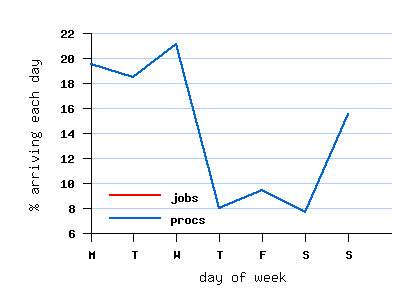
Here are the graphs for the workload generated for the LCG workload (the one I'm using for this experiment)
weekly cycle
x-axis: day of week
y-axis: % of jobs/processes arriving each day

Other criteria:
job size
job runtime

I'll generate this for 10000 cloudlets:

x-axis: time (starting from 0)(0 to 1000 sec)
y - axis: runtime, I've kept the submission time as 0


I don't think the graph is supposed to look like this.
So now I'm trying to do time vs load
In load I'm taking number of cloudlets that have started and not yet finished execution at a given point in time.