Monday, June 30, 2014

Modified Log of the LCG workload

Finally I have the correct log.  I think there is a bug in the standard workload format reader in cloudsim.... it just never reads the fields correctly.
Couldn't figure out how to read the SWF file in java... so I've read it using perl script.
Then, took only the needed fields
  1. Job ID
  2. Submit Time
  3. Wait Time ( Not Applicable when submitting workloads )
  4. Run Time
  5.  No. of Processors
  6. User ID
  7. Group ID
  8. Partition ID


Hopefully now the simulation will run correctly.

I also had another doubt... the generateWorkflow() method assigns the run time of the cloudlet to the the cloudletLength ( which according to defn is No. of instructions in MI ).
I came across this post from Rodrigo who is one of the developers of cloudsim...


So now i'm just going to assign run time/ Execution time to cloudlet length... cos its just a simulator...
Later when I'm running this in Eucalyptus or something, i'll use RuBIS application or something like that...

On another note... 
found another simulator which extends cloudsim called the workflowSimulator.
This simulate clusters jobs as tasks and submits them...
May be of use somewhere along the line.

Wednesday, June 25, 2014

Calculation of Estimated Finish Time

the issue in the previous post... how to calculate estimated run time. 
Each cloudlet requires 1 PE, so at a time if there are 2 cores in a host with 2 VM's at a time, only 2 cloudlets can excecute at a time...
so capacity of VM's with 2 cores are 2000/2 = 1000 and
capacity of VM's with 1 core is 1000/1 = 1000.

(In addition to this there is  a 10% performance degradation due to VM migration in time sharing mode.)

Tuesday, June 24, 2014

Calculation of estimated run time

In order to calculate the estimated run time est and eft have to be calculated for Time shared.
est : estimated start time
eft : estimated finish time
ct : the current simulation time
cores(p) : the number of cores ( processing elements) required by the cloudlet
rl : the total number of instructions that the cloudlet will need to execute on a processor.
In order to calculate capacity the following formula is used:

Using these formula, calculating eft for host with 1 core(PE) is correct
eg. VM #4 is allotted to Host #0, mips of VM#4 = 1000.
cloudlet executed on VM#4 has ID=5 and length= 969.
capacity = 1000 / max(1, 1) = 1000
eft = 0+ 969/1000 = 0.969.

But when I try to calculate for host with 2 cores, the estimated runtime is not coming correctly. 
Perhaps, it is mentioned in the defn that 10% performance degradation accompanied with VM migration...
Another problem is that when i try to calculate capacity for 10,000 cloudlets, where 1000 cloudlets are allocated to each VM, capacity =2000/1000 = 2
So actual run time for cloudlet ID 1 = 83/2=41, but in the simulation it gets over by 0.952 (what to do now :( :(
to be cont.....

Monday, June 23, 2014

Notes on Time shared VM scheduling and time shared Cloudlet scheduling.

So I got the simulation results, but nothing seems to be happening.
All the cloudlets start at 19.6 units of time.... i am assuming after all the cloudlets have been scheduled...
So now if we take a closer look...
I segregated the scheduling of cloudlets by VM... so sample output for VM#0 is given below.

If I use the formula, for Response time as start time - submit time.... I'm getting 19.6 for all the cloudlets...
and also if i see cloudlet ID 21 and 1, 9981, they all start at the same time...
(After looking at the concepts more thoroughly,  in time shared cloudlets and VM's, multiple cloudlets can multitask within a Vm )
I've specified VM Utilization Full.

Looking at the definition once more we see...

Allocation of VM's to the host

VmAllocationPolicy is an abstract class that represents the provisioning policy of hosts to virtual machines in a Datacentre. It supports two-stage commit of reservation of hosts: first, we reserve the host and, once commited by the user, it is effectively allocated to he/she.
And from this class, we use:
VmAllocationPolicySimple is an VmAllocationPolicy that chooses, as the host for a VM, the host with less PEs in use.

Resource usage by cloudlet


The UtilizationModel interface needs to be implemented in order to provide a fine-grained control over resource usage by a Cloudlet.

And from this interface we use:
The UtilizationModelFull class is a simple model, according to which a Cloudlet always utilize all the available CPU capacity.


Policy for cloudlet scheduling

CloudletScheduler is an abstract class that represents the policy of scheduling performed by a virtual machine. So, classes extending this must execute Cloudlets. Also, the interface for cloudlet management is also implemented in this class.
In this we use

CloudletSchedulerTimeShared implements a policy of scheduling performed by a virtual machine. Cloudlets execute time-shared in VM. 

Policy for VM scheduling

VmScheduler is an abstract class that represents the policy used by a VMM to share processing power among VMs running in a host. 
The policy we are using is
VmSchedulerTimeShared is a VMM allocation policy that allocates one or more Pe to a VM, and allows sharing of PEs by multiple VMs. This class also implements 10% performance degration due to VM migration. This scheduler does not support over-subscription. 

The model we are using is
Time shared for VM's and tasks
 
Note ** In time shared mode, multiple cloudlets ( task units ) can simultaeneously multitask within a Vm.

Why?
I can understand now if cloudlets have the same start time... but in a time shared environment, context switching takes place, so the finish time for the cloudlet should be more than the actual run time...
will check that now...  


Simulation results / workload

Before i proceed to code the algorithm I want to see some results in a graph so i know better what's going on.

The output I have now are
  • cloudlet ID
  • the VMID it executes on.
  • VMs are statically created on hosts so 
    •  Host #0: VM #4
    •  Host #1: VM #5
    •  Host #2: VM #6
    • Host #3 : VM #0, VM #7
    • Host #4 : VM #1, VM #8
    • Host #5 : VM #2, VM #9
    • Host #6: VM #3
  • Actual execution time,
  • Start time on the resource
  • End time on the resource.
I think what I'm doing now is like the control experiment which has static allocation.
VM's are already preallocated.
jobs in the form of cloudlets are generated and assigned to VM's.
A cloudlet requires an entire VM and it is time shared. A cloudlet also uses full utilization model so the entire CPU is used.
Some performance metrics used in the Iqbal et al paper are throughput

I need to first draw a graph for workload generation  I took this sample for the RUBiS workload from the Iqbal et al paper,
So
x-axis : Time (in min)
y-axis : Load level (new sessions)

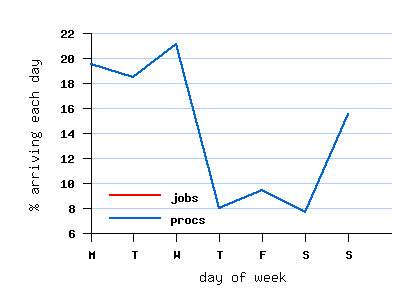
Here are the graphs for the workload generated for the LCG workload (the one I'm using for this experiment)
weekly cycle
x-axis: day of week
y-axis: % of jobs/processes arriving each day

Other criteria:
job size
job runtime

I'll generate this for 10000 cloudlets:

x-axis: time (starting from 0)(0 to 1000 sec)
y - axis: runtime, I've kept the submission time as 0


I don't think the graph is supposed to look like this.
So now I'm trying to do time vs load
In load I'm taking number of cloudlets that have started and not yet finished execution at a given point in time.

Generating load as a normal distribution

What seemed simple and straighforward turned out much more difficult...
End of the day, learned a lot of new stuff in Excel.

I wanted to generate the workload and distribute the starting time as a normal curve... the start time in the log was not getting read.

So generated the normal curve using this tutorial.
Then modified for 10000 values... the final load distribution, i.e., start times of the 10000 cloudlets will look something like this:

Max load will be around 200...

Will check to see if simulation works for this...

Wednesday, June 18, 2014

Notes on Workload generation

In order to measure performance and categorize the workload if required, i have to know what is the type of workflow generated.

Now reading the paper for LCG and how the workload was collected.
Performance metric used : job turnaround times to rank resources after matchmaking.

Sample jobs from the LCG log
 1        0     -1     83    1     -1    -1   -1     -1    -1 -1   1   1  -1 -1  1 -1 -1
    2        3     -1   3611    1     -1    -1   -1     -1    -1 -1   2   2  -1 -1  2 -1 -1
  • each workload is stored in a single ASCII file
  • each job is represented in a single line.
  • irrelevant fields are marked with -1

FIELDS

  1. job number
  2. submit time
  3. wait time (sec)
  4. run time (sec)
  5. no. of allocated processors
  6. avg CPU time use
But what i found out was when it is converting the log files and taking,
The job number as cloudlet ID, fourth field is stored as cloudLetTotalLength

Hiccups:

I don't know why after workload is generated all submission times are 0 whereas in the swf file variable submission times are given.

Tried to get the cloudlet information after workload submission
1
 History:No history is recorded for Cloudlet #1
 Status:Created
All resource ID's:null
Cloudlet FileSize:1
Finished so far:83

cloudlet Length:83
Op Size:1
cost per sec:0.0
start time:0.0
End time:-1.0
net service level:0
Pe's:1
proc cost:0.0
user id:-1
cpu utz model:org.cloudbus.cloudsim.UtilizationModelFull@b1cc87


I'm thinking its probably a bug 'cos start time never gets read anywhere....
So I wrote some code to submit each job after a 3 second delay.(If more datacenters are simulated, i could probably have jobs submitted at the same time to simulate simultaenity.
I segregated the output to by VM's

To be done:

write code in java to display chart for the output because now making any deductions from the log is difficult


Tuesday, June 17, 2014

Simulation of Provisioning algorithm

Algorithm for provisioning in cloudsim

(Understanding code to modify the broker policies)

First, i thought I'll see what are the models that cloudsim uses by default and the meaning of those modules.

The cloudlet is set to utilizationModelFull
The UtilizationModelFull class is a simple model, according to which a Cloudlet always utilize all the available CPU capacity.
Other models available are:

UtilizationModelNull
The UtilizationModelNull class is a simple model, according to which a Cloudlet always require zero capacity.

UtilizationModelStochastic
The UtilizationModelStochastic class implements a model, according to which a Cloudlet generates random CPU utilization every time frame.

Vm

It takes id, user id, mips, no. of pe's, ram, b/w, size, name and cloudlet sheduler.
eg.,  Vm vm = new Vm(0, brokerId, mips, pesNumber, ram, bw, size, vmm, new CloudletSchedulerTimeShared());
  • CloudletScheduler is an abstract class that represents the policy of scheduling performed by a virtual machine. 
    • space shared, time shared and n/w cloudlet space shared. 

Host 

RamProvisionerSimple is an extension of RamProvisioner which uses a best-effort policy to allocate memory to a VM.
BwProvisionerSimple is a class that implements a simple best effort allocation policy: if there is bw available to request, it allocates; otherwise, it fails.
VmSchedulerSpaceShared is a VMM allocation policy that allocates one or more Pe to a VM, and doesn't allow sharing of PEs. If there is no free PEs to the VM, allocation fails. Free PEs are not allocated to VMs

Other VMM allocation policies available
VmSchedulerTimeShared is a VMM allocation policy that allocates one or more Pe to a VM, and allows sharing of PEs by multiple VMs. This class also implements 10% performance degradation due to VM migration. This scheduler does not support over-subscription.

Datacenter

We used VmAllocationPolicySimple(hostList) in the data center characteristics, this means that it  chooses, as the host for a VM, the host with less PEs in use.

Changing the broker policies

 to submit cloudlets and vm's according to user given policies.
Modified cloudlet by adding start time.

Got some code courtesy of Mario Henrique to change the broker policies, don't know how it works.
submitCloudlets() method is modified.
if cloudlet is not assigned a VM, a VM ID is obtained from the VM's created list
 if (cloudlet.getVmId() == -1) { //if user didn't bind this cloudlet and it has not been executed yet
                vm = getVmsCreatedList().get(vmIndex)
;
(understood this part...)
Now there is something called the SimEntity which represents a simulation entity. An entity handles events and can send events to other entities.
Direct subclasses are Datacenter, DatacenterBroker, so these classes directly inherit the SimEntity and thus invoke the methods in SimEntity.
Some methods are
  •  getName(): gets the name of the entity.
  • getNumEventsWaiting() : Count how many events are waiting in the entity's deferred queue.
  • pause(): 
  • schedule(String dest, double delay, int tag, Object data )
  • send(int entityId, double delay, int cloudSimTag, Object data) - Sends an event/message to another entity by delaying the simulation time from the current time, with a tag representing the event type.
    • entityName - the name of the destination entity
      delay - how long from the current simulation time the event should be sent. If delay is a negative number, then it will be changed to 0
      cloudSimTag - an user-defined number representing the type of an event/message
      data - A reference to data to be sent with the event
       
Another class of interest is the Vm classs, some methods are
  • VmList : 
  • VmcreatedList: 
In our program we are creating all VM's at once so VmList and VmcreatedList are the same.
  • getVmList - method is available for DatacenterBroker, Host and Datacenter.
Then under the DatacenterBroker class certain methods are available such as:
  • setCloudletList(List<T> Cloudlet);
  • setCloudletSubmittedList(Lis<T> Cloudlet);
  • setcloudletReceivedList(List<T> Cloudlet)
So in this piece of code
send(getVmsToDatacentersMap().get(vm.getId()),myCloudlet.getStartTime() CloudSimTags.CLOUDLET_SUBMIT, myCloudlet);
  • Entity name : refers to the datacenterid that the given vm is present in, in our work only one datacenter is there so it is always 2
  • Delay : we will give the start time because the delay refers to the time from beginning when the cloudlet is supposed to start
  • CloudSimTag is set to CLOUDLET_SUBMIT which is 21.
  • Then the Object that is sent to the particular datacenter is the cloudlet.
Output:
Sent-  Entity Name: 2  Delay: 35.0  CloudSimTag: 21
2 : org.cloudbus.cloudsim.Vm@1c1c92b            


Then this particular piece of code
vmIndex = (vmIndex + 1) % getVmsCreatedList().size();
assigns by incrementing vmIndex within 0 to 10 because we have 10 VMs created.

Work done so far:

Simulation works for 10,000 cloudlets.
(There are 1 lakh cloudlets in the LCG workload for which my simulation does not execute.)
have understood basics of modifying code to cloudlet and datacenterbroker.

Work to be done:

figure out how to measure performance,
how to categorize the workload by analyzing it.